TOTAL VISITS

Wednesday, 7 October 2015

View Blogger JSON Feeds in Human readable Format

Viewing Blogger Json and XML feedsFor web technologies like "Google Blogger blogs" also known as "blogspot blogs", a flexible medium for transporting data from one platform to another is mandatory. For this purpose blogger blogs uses XML to serve Feeds in Atom/RSS formats as a flexible source of data transport and data sharing between third party Content Management systems like Wordpress. With the introduction of JSON in Blogger Data API, it has now become even faster to fetch data and interchange it between blogspot server and browser. Since the default XML and JSON files are compressed in size and all data is presented without indentation in a single line, it becomes difficult to understand the Parent/child relationship of data and view the structure properly. In this part of the tutorial series you will learn how to view Blogspot JSON Feeds and XML Feeds in a human friendly format with clear indentation and tree structure. What you will learn today is a serious Post Mortem about blogspot blogs!

Note: Click the Button below to see full list of topics under discussion.

Topics List

Convert JSON Strings to a Friendly Readable Format

Follow these steps to convert your JSON feed into a tree structure.

1 Paste your Blog Feed JSON URL in browser

http://www.mybloggertricks.com/feeds/posts/default?alt=json

Note: Replace the domain name with yours

2 Copy all the code inside the browser

Tip: Press Ctrl + A followed by Ctrl + C  to select and copy all data

raw JSON


3 Next Visit JSON Viewer and paste your code inside the TEXT tab as shown below

viewing JSON feeds

4 Finally switch to VIEWER tab, You will see a neat and clean representation of your JSON feed Objects and Arrays in a tree structure format.

Blogger JSON Feeds structure


  • The most important object is the { } Feed object, which contains all data about your blogspot blog. The [ ] entry is the most important array inside the Feed object which contains all data about your Blog posts.  

For example if you wish to find the total number of comments posted on your most recent post, its author name, Post title, Post publishing date and so on then simply click/collapse the starting object inside the entry array i.e. { } 0

Entry array in JSON Feeds

Note:

  • Objects are represented in curly braces { }
  • Arrays are represent in square brackets [ ]

Where,

  • { } id is the unique ID that blogger assigns to each post.
  • { } published is the Post publishing date
  • { } updated is the Post editing date
  • [ ] category shows the list of Labels assigned to this post
  • { } title gives the Post Title text
  • { } content shows the Post content depending on what settings have you assigned for your blog Feeds
  • [ ] link contains important URLs to Comment Form, Comment Feed and Post Page URL.
  • [ ] author includes all data about Author name, Author Thumbnail and Google+ profile link
  • { } media$thumbnail gives the featured thumbnail image URL. If Post contains no image, then this object will be absent.
  • { } thr$total shows the Comments Count.

In my next post, you will learn in detail on how to parse JSON using JavaScript to fetch data form all these Objects and Array nodes.

View Blogger XML Feeds in Human-Readable Format

Note:
Although our Tutorial series focuses mainly on how to fetch data from JSON feeds, we are also giving you information regarding viewing XML feed data just for the sake of learning. You can skip this part if you wish.

First you need to download any freeware XML viewer software available online. I recommend "XML Viewer" or "XML explorer". In my case I am using XML explorer.

Once you have installed this lightweight software, you need to follow these steps:

1 Visit your blog and press "Ctrl + U"

2 You will now be able to see your source file. Search for this

application/atom+xml

3 Click the XML Feed link which looks similar to this one

XML Feed link 

4 Next copy all the raw XML Atom Feed code that you see on screen

raw XML Feed

5 Now paste it inside your XML viewer software. If you are using XML Explorer, select "New from Clipboard" option and all the code will be auto paste inside the software and converted into a readable format.

pasting in XML explorer


XML looks just like HTML where all data is enclosed inside custom tags.

Channel tag in XML atom FEED

  • Here the most important tag is <channel> which contains all data about your blog form Labels list till Post info. We used to call it { } feed in JSON.

item tag in XML atom feeds

  • The next most important tag is the <item> tag which contains all your Post data. This tag is renamed as [ ] entry in JSON.

Where:

  • <guid> tag contains your Post ID
  • <pubDate> tag contains Publishing Date
  • <atom:updated> tag contains the Last Edit date
  • <category> tag tells us about the Labels used in the post
  • <title> tag gives the Post Title
  • <description> tag contains all Post content.
  • <link> gives a Feed link which is of little use.
  • <author> tag contains info about Author Name and Thumbnail Link. Note that unlike JSON feeds XML feeds does not provide Google+ Profile Link of Authors.
  • <thr:total> tag contains total Comments Count
  • <feedburner:origLink> tag contains the Post URL

XML feeds play a major role when you migrate your Blog to a non-blogger platform or when you update your readers with newsletters through Feed aggregators. All your Post data and comments info is included inside that XML import file.

Have Questions?

I hope you enjoyed this interesting post mortem of blogspot blogs where you get a clear idea of how data is organized in such content management systems through XML and JSON feeds. In our next parts, we will be covering the coding part and discussing delicious ways to parse JSON in JS. Let me know if you need any help in better understanding any concept covered in last two parts of this longest tutorial series shared first time on web.

Have great time learning and experimenting buddies. Peace and blessings be upon you all! :)

Monday, 5 October 2015

Introduction To Blogger JSON Feeds and Blogger API

Blogger JSON Feeds - IntroductionAfter the introduction of Blogger Data API v3 and its support with JSON Feeds, blogspot blogs have become the new hub of UI creativity for web designers. Almost every developer is busy creating fancy Blogger templates using JSON feeds to fetch important data such as Post Summary, Title, Timestamp, Comments count, Thumbnail image, Label List, Author info and so on. Developing of all these useful widgets and templates was never that easy before until Google provided support for JSON Feeds using the parameter ?alt=json . You might be confused on what techy stuff are we talking here but if you really wish to start developing Blogspot widgets from scratch and start designing professional templates then this tutorial series will take you on the most interesting and easy-to-understand ride. We will be publishing around 10+ interesting tutorials first time on internet to help a newbie blogger to learn how to communicate better with data stored on his blog and how to start talking to it!

This tutorial requires you that you may have some basic understanding of HTML/CSS/JavaScript no advanced know-how is required and you don't need to be a skilled programmer to understand all these concepts. We will try our best to make it as easy as possible.

Note: Click the Button below to see full list of topics under discussion. BTW the list below is also updated using JSON ;)

Topics List

Examples of Gadgets created using JSON Feeds

Lets first see what can JSON do for you. I am sharing below some of the most popular widgets created for blogger blogs using JSON Feeds provided by Blogger API. All widgets listed below have been developed by STCnetwork for our clients and we will be sharing with you how to code similar widgets from scratch in coming days. 

1. Recent Comments Widget

UPDATE: Recent Comments Widget For Blogger Released!

One of our clients requested a plugin which would show the list of recent comments posted by users. He also wanted to display Post titles and Comments' timestamp inside CSS3 tooltips that we introduced in our shortcode plugin. The JSON feed for comments does not include Post Title data so we had to work around the permalink using JavaScript split function to make it work. The result was something as shown below:

recent comments widget with tooltips

2. Recent Posts by Label

UPDATE: Recent Posts with Featured Thumbnails released!

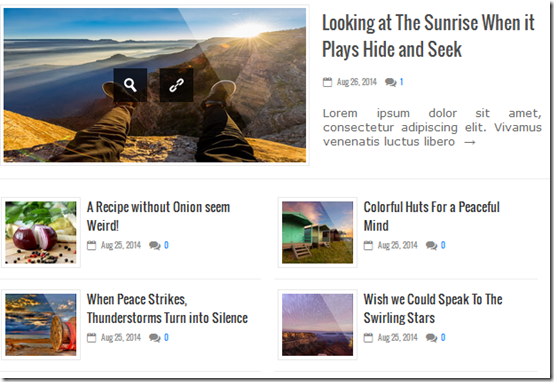
You might have seen several new magazine style templates designed on blogger that shows list of recent posts by Label/category in Vertical / horizontal / gallery view. In one of our most recent templates that we will release quite soon, we implemented this use of JSON feeds in the most creative way possible. Some screenshots of our latest designs are first time shared below:

Horizontal List

Recent posts in List view

Gallery View

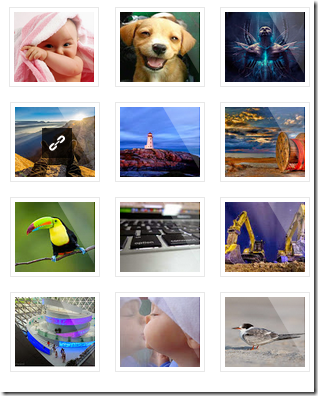
Recent posts by label in gallery view

Landscape View

recent posts by label in landscape view

Simple Horizontal List View

This plugin was also created for some clients who requested "Edited" option which is often seen on Facebook posts. We introduced a similar in blogger using JSON Feeds' updated object property. You will learn them all!

recent posts by label in horizontal view

Interesting Fact!

We created all the above widgets using a single script concept, rest it is all CSS which gives them the different look.

3. Table of Contents

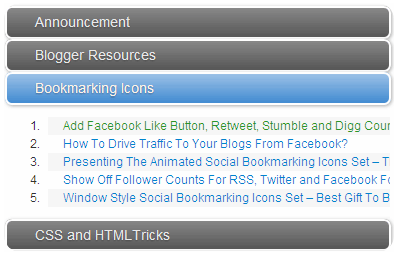
table of contents created using JSON feeds

and so.............. 

later in this tutorial series, you will learn several ways to create new widgets for your blog like "Total posts by author", "Total posts, Total comments count on your blog" and several ways to request data using JSON and display it on your blog.

What is Blogger JSON Feed?

JSON (JavaScript Object Notation) is a lightweight data-interchange format. It is easy for humans to read and write. It is easy for machines to parse and generate. It allows the browser to interact easily with your blog server and fetch data much more faster compared to XML which is much slower in this case.

Google Blogger Team stores all its Posts and Comments data (users data, category list, authors names, profile links, posts titles, post URLs, article content, thumbnails, publish date etc.) inside human-readable files called XML. Accessing data through XML is slow because it requires a XML parser to parse data. Therefore Blogger Data API provides us with JSON support which is a smart alternative to XML files. JSON can easily be parsed through a JavaScript function and is much quicker to read and write compared to XML.

XML Feed URL in Blogger

Blogger XML is served in Atom as well as RSS format so it can be accessed in two ways:

ATOM: http://www.mybloggertricks.com/feeds/posts/default

RSS: http://www.mybloggertricks.com/feeds/posts/default?alt=rss

Using XML Feeds, you provide information about your blog to feed aggregators services like Feedburner and search engines like Google by letting them know easily where each data is located. It serves the same purpose as JSON but JSON is much quicker in performance. Even your blog sitemap is created in XML format and accessed via /sitemap.xml

JSON Feed URL in Blogger

JSON: http://www.mybloggertricks.com/feeds/posts/default?alt=json


Fact
The reason why a Blogger JSON file is called "JSON feed" is because of the Feed object as shown in the screenshot below inside {curly braces}.

JSON FEED object

The feed object is where all your blog data is stored as shown below.

    JSON Objects and Arrays

    JSON syntax is made up of these elements:

    • Data is stored in name / value pairs
    • Curly braces hold objects { }
    • Square brackets hold arrays [ ]

    In short Blogger JSON Feeds stores your blog data in an organized way and allow third-party services to easily access all this data.

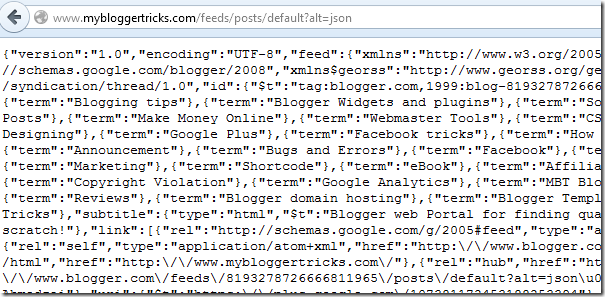
    Note: By default JSON feed appears in complex non-readable format as shown below. In next part you will learn how to view it in organized tree-structure format as shown in the screenshots above.

    raw JSON

    What is Blogger API?

    "API" stands for Application Package Interface which is the communication medium for Applications to interact with each other. The developers of an application provides APIs if they want other developer to create apps and interact with their own. Similarly, the Blogger team has created an API of its own that allows external developers to interact with the Blogger content management system.

    The Blogger Data API allows client applications to view and update Blogger content in the form of Google Data API feeds. Your client application can use the Data API to create new blog posts, edit or delete existing posts, and query for posts that match particular criteria.

    With this API you can:

    • Add Posts, Pages and Comments from your blog to a non-blogger site
    • Create a Desktop Software that allows users to create or edit Blogger posts from their desktop computers
    • Create browser and mobile-based apps that serve the same purpose as above

    The JSON feed which provides information about your blog is also provided by Blogger API. Thus Blogger API gives us a great medium to create so many useful widgets and apps.

    Some non-techy newbies often confuse Blogger JSON API with Blogger JSON Feeds. JSON feeds are simple files used for storing/interchanging data while JSON API is a Application Package Interface that allows it to interact with other 3rd party applications.

    For details refer these links:

    Note:
    Throughout our tutorial we will be only concerned with JSON Feeds provided by Blogger Data API and we wont discuss further details about how this API works because this requires advanced programming skills which is beyond the scope of this tutorial series. 

    Have Questions?

    Let me know if you failed to understand any logic or any part of this tutorial. In our next tutorial, you will be introduced towards tools to view JSON and XML in tree structure and human-readable format. Stay tuned and subscribe to our updates for learning all about building better blogger templates and widgets!

    Take good care of yourselves. Peace and blessings be upon you all always! =)

    Friday, 2 October 2015

    Beutifull Urdu Quotes And Sayings

    We Uploaded,Urdu Quotes,The Sayings Of Hazrat Ali (R.A),Urdu Font Pics Of Best Urdu Quotes, Best Urdu Font Msgs For Facebook Whats App ,These Are Beutifull  Islamic 
    Quotes For You,Urdu Quotes Is Most Femous In Pakistan,


    Tuesday, 29 September 2015

    Lover Urdu Poetry Pics And Images


    Urdu Poetry Images For Lovers,Urdu,Photos Lovers,Sad,Love,Poetry
    Love Pics .MSG Urdu,Best Wallpapers IN Urdu For Lovers


    Monday, 21 September 2015

    2 Lines Letest Urdu Poetry

    urdu poetry  collection,sad urdu poetry .urdu lovers poetry,urdu love shaiyari,sad poetry for lovers,romantic poetry in urdu,romantic  poetry,colection of best urdu poetry,urdu font love poetry,urdu sms poetry, sms shaiyari,Urdu Poetry,free latest love poetry,Urdu Poetry lovely & friendly ,Lovely Romantic Urdu Poetry Story,Original romantic and lovely urdu poetry,Original romantic and lovely urdu poetry,Best collection of urdu romantic poetry,New lovely romantic urdu sad poetry,Urdu Romantic Lovely Poetry, Urdu teen age girl shayairy romantic and lovely Urdu Shayari,Urdu Poetry ,Towlines Best Poetry,Urdu,Sad Poetry,Romantic Poetry,Shayari,Urdu Sms 2line,Urdu Sms 2line,Urdu Sad Sms,Love Poetry, Urdu freind Lovel poetry, urdu sad love girl image Pictures shayari. ghazal Urdu sad poetry is really sad ghazal poetry written in Urdu poetry sad poetry ghazal language. 2 Lines urdu love poetry 2 line urdu love shayari Friend's Lovely Photo Poetry,


    Thursday, 10 September 2015

    How can a "Fish Aquarium" Keep you Punctual in Office?

    Fish aquarium keeps one punctual in officeAround 22 beautiful and colorful Malawi, guppy and tropical fishes joined STCnetwork! These fishes were brought in for a purpose that is extremely related to work productivity and performance. The most difficult of all things for an entrepreneur is remaining punctual with office work. When you have no boss at top to monitor and supervise your activities, as a human we are all bound to become lazy and lethargic at some point and especially unpunctual when it comes to Office timings.  I love sleeping a lot and barely open my eyes unless I have slept enough for 12 hours! As a result my office opening timings are never fixed, sometimes I go at 11:00 AM while sometimes I go at 3:00PM. Indeed this habit will make me dump and lazy in future if I don't take precautionary steps to avoid sleeping a lot and making sure I setup a fix time to go office every morning. Neither did exercise help me with this lazy habit nor did sleeping early at night. The only best solution that I came around was placing a "Fish Aquarium" or "Fish Tank" at the Office!

    Fish Feeding really makes one Punctual

    Fishes are fed twice every 24 hours using a food supplement that looks like spherical balls which includes necessary nutrition for a healthy fish life. These fishes are so cute and adorable that you can barely miss feeding them on time else they would have a much shorter life and some would barely survive. Fishes even eat each other's wings or tails when they are not properly fed. Since they are living beings just like us, so I make sure that I treat them with care and feed them on time without delaying.

    This habit has made be in fact quite punctual. Sometimes I jump off my bed just to reach office the sooner possible so that I may feed these little babies on time with proper diet. Just yesterday, I left my breakfast because I had a dull sinking sensation within my stomach that may be the little creatures are hungry, so I rushed straight to Office and started feeding the little ones. I had my breakfast after the fishes were properly served!

    Aquarium keeps you and your customers socially active!

    I never feel alone when I am in office thanks to these colorful little beings that smiles at you when you look at them. They even are quite hospitable to customers who visit the office. Customers find these colorful creatures quite fascinating and these clever beings never miss an opportunity of bringing a smile on a new visitor's face. =)

    They keep the office lively, full of love, harmony and joy. Seeing so many lively colors in front of your eyes really makes one more productive and vigilant throughout the day.

    Some Tropical Fishes are deadly carnivorous!

    I am not sure if this term would be right for these beautiful little creatures but in fact the little ones are way quicker and sharper compared to the larger ones. Two days have passed now and around 4 of the fishes are hunted down by the Shifu Gang (it's the name I have given to the naughty ones), amongst the dead are the black balloon fish and few Malawi ones. The shifu group eats up the tails and wings of the bigger ones and I honestly feel too bad when I find a fish being badly tortured by this group. I am new to fish keeping and not well trained on what combination of fishes are kept together to make sure they breed and live for a longer period. The shop keepers being profit-motivated misguided me in this matter but with time I am learning how to keep better care of them and make sure no one is harassed! =d

    Share your experience and feeding tips!

    Let me know what tips could you give me to take better care of these little babies and make sure they are well looked after. How often do you feed them and what tips can you share regarding the combination and selection of same type of fishes that live in harmony without eating up each other! :p

    Thursday, 3 September 2015

    Design Responsive Blogger Templates - Step by Step Guide

    how to design responsive blogger templatesFinally we are done with the most comprehensive and descriptive tutorial series on Google powered  blogger blogs. We have discussed the core basics to create and develop a mobile responsive layout using simple CSS3 @media queries and some built-in scripts. This series will help you understand the step-by-step effort involved in transforming an ordinary static, inflexible and non-responsive blogger template into a fluid and responsive one that may help you improve your Mobile Search traffic and better entertain your users with a mobile friendly user-interface (UI). A Mobile UI is an important SEO ranking metric and helps you improve your mobile pageviews and thereby the site CTR revenue.

    Why bother creating a responsive design?

    Google recently rolled out a Mobile Friendly update on April 21, 2015, which boosts the ranking of mobile-friendly sites on mobile search results.  Google no longer favors fixed width layouts and recommends that all sites must provide better touch experience, where text should be readable without tapping or zooming, tap targets are spaced appropriately and the page avoids unplayable content or horizontal scrolling.

    Running out of time? Let's read a brief summary to each part.

    Brief Summary

    Here we demonstrated what exactly are responsive designs and how they are created using CSS3 @media screen queries. Normally mobile browsers emulates a desktop view by squeezing big resolutions into small screens that is often difficult to read and browse. You must be familiar that how difficult it is to click a web link in iphone unless you zoom it.

    Therefore we make sure all elements on the site from buttons, links and images/media provide a better touch experience. To make them look big and clean with clear resolution all that needs to be done is to add Meta Viewport tag in the page header and some CSS3 Media queries that does all the job.

    Breakpoints are points at which your layout design breaks or crashes. Breakpoints are CSS3 Media Queries that tells the browser which Layout to load for your website based on the screen size (viewport). It controls the display of your user interface (UI) on mobile devices.

    With so many Mobile Products in market where each smartphone or tablet has a different Screen size, it is important that we select some Content Specific Breakpoints so that your blogspot page may adjust and fit perfectly to the different screen sizes and may not looked squeezed or poor in resolution

    3. Hiding Widgets & Scripts in Mobile Templates [1], [2]

    Surprisingly blogger templates supports a rarely used mobile conditional expression i.e. isMobileRequest which is a Globally Available Data which can be applied to any HTML DOM inside the template. isMobileRequest  is a Boolean Data Type that accepts only two values which is either True or False. It can be used to show or hide HTML content or widgets containers in smartphone devices. It currently does not support Tablets or iPads etc. but you can surely use it to prevent rendering of unnecessary widgets and scripts on mobile devices to speed up your page load time on small screen devices.

    This tag also helps you to avoid using CSS Display:none  to hide content on your site which is not a SEO friendly approach to responsive designs. Thus it is really a time saving condition that gives you more control and power over the blog content that loads in mobile phones.

    The fundamental part of a responsive design is the structure of its Header which includes your blog logo and navigation menu. This tutorial shares an easy to use responsive drop down menu with a search functionality. This menu can be displayed on both PC Desktop screens and smartphones and tablets. You can also choose to maintain your current desktop menu and instead chose to use this responsive menu for mobile screens only. A simple fix to the most important component of your mobile layout.

    Ever wondered how to make your blog images to auto adjust their dimensions in mobile phones and tablets without effecting its resolution and quality? Images with large sizes often don't fit in small screen devices and as a result gives a bad UI impression. Images must be fluid in its behavior, their width and height dimensions should be stylized such that they may instantly change their overall size as the browser screen goes smaller or bigger.

    Our approach is based on CSS @media Queries unlike adaptive image methods which makes use of JavaScript of php.

    Are you among people who complain about AdSense responsive Ad units showing a blank space on your webpage? If yes then read this tutorial to fix this blank rendering issue and better style your responsive ads for different screen sizes using device breakpoints.

    7. Make Blog Sections Responsive: Header Widgets, Posts + Sidebar, Footer

    Since we have learned the core basics, now its time to start customizing different sections of your blog and make them auto adapt to mobile screens. This tutorial in chunk discusses ways to mobilize the 4 important sections of your blog which are:

    1. Header
    2. Content area
    3. Sidebar
    4. Footer 

    Need Help?

    I hope this short summary of different parts of this major and longest tutorial will help you take a helicopter view of every tools and methods required to customize your beautiful blogs into a mobile supported layout that may better help your readers to browse and read your articles. Thus giving you the advantage of both pageviews and search ranking. Let us know if you need any help and I would love to answer all your queries. Peace and blessings buddies! =)